Static Occupancy
The single most expensive thing a bullet does each frame is the raycast, it crosses the engine boundary into the physics engine's broadphase and narrowphase, and its cost scales with scene complexity. One bullet is nothing; hundreds of bullets each raycasting every frame is the dominant cost in a busy scene.
An occupancy grid attacks that cost directly. It's a voxelised map of where solid geometry is. Before each raycast, the solver asks the grid a pure-math question, "is the segment the bullet is about to travel definitely empty?", and if the answer is yes, it skips the raycast entirely. No engine crossing, no broadphase, nothing.
Static occupancy is for geometry that doesn't move: the map, walls, terrain, buildings. You bake it once and it answers queries for the lifetime of the round.
The Idea
You bake the world's solid parts into a voxel grid at some resolution. Each voxel is either occupied (solid geometry passes through it) or empty. To test a bullet's frame segment, the grid walks the voxels along that segment:
- If every voxel on the segment is empty, the segment is provably clear -> raycast skipped.
- If any voxel is occupied, the segment might hit something -> the real raycast runs to find the exact contact.
Once a behavior has a grid attached, the grid decides whether a raycast happens at all. When it reports a segment clear, the raycast is skipped outright, no raycast means no hit, no matter what is physically there.
So an unbaked part is not "handled by the normal raycast path", it is invisible to bullets. They
pass straight through it. A part ends up unbaked if it is outside the baked region, tagged
VetraOccIgnore, or added to the map after the bake. A segment is also reported clear when it lies
entirely outside the grid's baked bounds, so anything beyond the region you baked stops colliding
too.
The rule: bake every region and every part you need bullets to collide with. Only leave something
out when you genuinely want bullets to ignore it, that's what VetraOccIgnore is for.
Occupancy vs RaycastParams
These two look like they do the same job, both end up deciding what a bullet hits, but they work at different stages and don't substitute for each other:
RaycastParams | Occupancy grid | |
|---|---|---|
| Stage | Inside the raycast | Decides whether the raycast runs |
| Question | "Of the things this ray passes through, which count?" | "Is this span empty enough to skip the ray?" |
| Source of truth | Live workspace, always current | The bake, a snapshot of the world |
| Cost | You still pay for the raycast | Skipping the raycast is the optimization |
The order is what matters: the grid runs first, and RaycastParams is only consulted if the grid
says the span isn't clear. A cleared span never reaches the raycast, so its filter never runs.
That gives a clean rule for which to reach for:
- Bullets should never hit it (the shooter, their own cosmetic bullet, the team they're on):
that's
RaycastParams. It's a live, per-shot decision, and it's the only one of the two that can vary per bullet. - Nothing is there, don't bother looking: that's the grid. It's a static, shot-independent performance claim about empty space.
The failure mode is treating the grid as a filter list. Leaving a part out of the bake to "make
bullets ignore it" works, but bluntly and globally, it's invisible to every bullet using that grid,
and you lose the raycast that would have told you it was there. If a specific bullet should ignore
a specific part, that's RaycastParams, and the part still needs baking so other bullets collide
with it.
A bullet with both consults the grid first, then applies RaycastParams to whatever raycast
survives. A part must be in the bake and pass the params to be hit. Excluded from either
one, and the bullet goes through it.
Baking a Grid
Create a grid at a chosen voxel size, then bake a region of the workspace into it:
local Vetra = require(ReplicatedStorage.Vetra)

-- 4-stud voxels: smaller = more precise + more memory, larger = coarser + cheaper
local grid = Vetra.StaticOccupancy.new(4)

-- Bake everything inside a region box into the grid
Vetra.VoxelBaker.BakeRegion(
    grid,
    CFrame.new(0, 50, 0),          -- region center
    Vector3.new(2048, 512, 2048),  -- region size (studs)
    { Verbose = true }             -- optional: print bake stats
)
BakeRegion scans every part whose bounds fall in the region and marks the voxels each part covers.
It yields periodically so a large bake won't freeze the frame.
Faster bakes with parallel workers
For large maps, BakeRegionParallel distributes the bake across Actor workers and falls back to the
serial bake if workers are unavailable:
Vetra.VoxelBaker.BakeRegionParallel(
    grid,
    CFrame.new(0, 50, 0),
    Vector3.new(4096, 512, 4096),
    8,              -- worker count
    { Verbose = true }
)
Excluding parts from the bake
Tag parts with VetraOccIgnore, the default ignore tag, and the baker skips them. You can override
the tag list via the bake opts.
Tagging a part means bullets stop colliding with it, they'll pass through as if it weren't there. That's the point for things bullets should ignore anyway (decals, trigger volumes, non-collidable props), but it makes the tag a footgun on anything solid. If you tag a wall, bullets go through the wall.
VetraOccIgnore doesn't send the part back to the normal raycast path, it removes the part from the
bullet's world entirely. There's no way to have a grid attached and still collide with an unbaked
part; the raycast that would find it never runs. See the danger note above.
Bake API
| Function | Description |
|---|---|
BakeRegion(grid, cframe, size, opts?) | Bakes every part in the region box into grid. Yields periodically so a large bake won't freeze the frame. Returns grid. |
BakeRegionParallel(grid, cframe, size, workers?, opts?) | Same bake spread across Actor workers (default 8). Warns and falls back to BakeRegion if workers are unavailable. Returns grid. |
Both take the same opts table, every key optional:
| Key | Default | Description |
|---|---|---|
Verbose | false | Print part count, voxel count, elapsed time, and voxel size when the bake finishes. |
ignoreTags | { "VetraOccIgnore" } | Tags whose tagged instances are excluded from the bake. |
overlapParams | nil | Your own OverlapParams, replaces the tag-built one entirely. ignoreTags is ignored if you pass this. |
The baker isn't a bounding-box approximation. Balls, cylinders, wedges, and corner wedges are marked
against their true shape, so a wedge doesn't mark the empty half of its bounding box. MeshParts,
Unions, and parts with a SpecialMesh can't be resolved this way and fall back to filling their full
bounding box, meaning a mesh marks more voxels than it strictly occupies. That's the safe direction
to err, an over-marked voxel costs a real raycast, while an under-marked one would skip geometry
that's actually there.
Attaching It to a Behavior
A baked grid does nothing until a behavior references it. Attach it with the builder:
local Behavior = Vetra.BehaviorBuilder.new()
    :Physics():MaxDistance(1000):Done()
    :StaticOccupancy(grid)
    :Build()
From then on, every bullet fired with that behavior consults the grid before each raycast.
| Setter | Field | Default | Description |
|---|---|---|---|
:StaticOccupancy(grid) | StaticOccupancy | nil | The baked grid to test segments against. nil disables it. |
When It Helps (and When It Doesn't)
The grid pays off when most segments are empty air, long-range fire across open maps, dense volleys where the majority of bullets are mid-flight over nothing. In those scenes it can collapse the overwhelming majority of raycasts into cheap voxel walks.
It helps less, or not at all, when bullets spend most of their travel near or inside geometry (every segment touches an occupied voxel, so the real raycast runs anyway). And there's a memory and bake-time cost proportional to the region size and voxel resolution.
On the serial solver, static occupancy is a clear win in open scenes. On the parallel solver its value is more situational, the parallel base step already spreads raycasts across cores, so skipping them buys less. It shines most on the parallel high-fidelity path, where each bullet would otherwise fire many sub-segment raycasts per frame. Profile your own scene to decide.
Choosing a Voxel Size
Voxel size is the core tradeoff:
| Voxel size | Precision | Memory | Bake time |
|---|---|---|---|
| Small (1,2 studs) | Resolves thin walls; fewer false "occupied" | Higher | Slower |
| Large (6,8 studs) | Coarse; thin walls may over-mark neighbours | Lower | Faster |
Match voxel size to the thinnest geometry you need the grid to resolve. If a wall is thinner than a voxel, the grid still marks that voxel occupied, so the bullet correctly falls back to a real raycast there; you just get fewer skips near thin geometry. A voxel size around the scale of your typical cover thickness is a reasonable starting point.
Serialization: Bake Once, Load Forever
Baking is the expensive part, and for static geometry the result never changes. Rather than re-voxelizing the map on every server start, bake once in Studio, save the result into the place file, and load it at runtime.
grid:Serialize() returns the grid as a binary string. OccupancyChunks handles getting that string
into and out of the place file: a serialized grid easily exceeds Roblox's per-StringValue limit, so
Write base64-encodes the blob and splits it across numbered StringValue chunks under a folder.
Step 1: bake and save (run once, from the Studio command bar)
local ServerStorage = game:GetService("ServerStorage")
local Vetra         = require(ReplicatedStorage.Vetra)

local grid = Vetra.StaticOccupancy.new(4)
Vetra.VoxelBaker.BakeRegion(
    grid,
    CFrame.new(0, 50, 0),
    Vector3.new(2048, 512, 2048),
    { Verbose = true }
)

local folder = Instance.new("Folder")
folder.Name   = "YourBaking!"
folder.Parent = ServerStorage

Vetra.OccupancyChunks.Write(folder, grid:Serialize())
The generated folder has to end up in the place file, not just in a running session. There are two ways to get it there:
- Run it from the command bar while not playtesting. The folder is created directly in the edit session, so saving the place keeps it. Simplest option.
- Run it during a playtest, then copy the folder out. Right-click the folder in the Explorer and
Copy it before stopping, then Paste it back into
ServerStorageonce you're back in edit mode. Everything the run created is discarded when the playtest ends, so copying afterwards is too late.
Either way, save the place afterwards. You'll end up with a folder of numbered chunks in the Explorer:
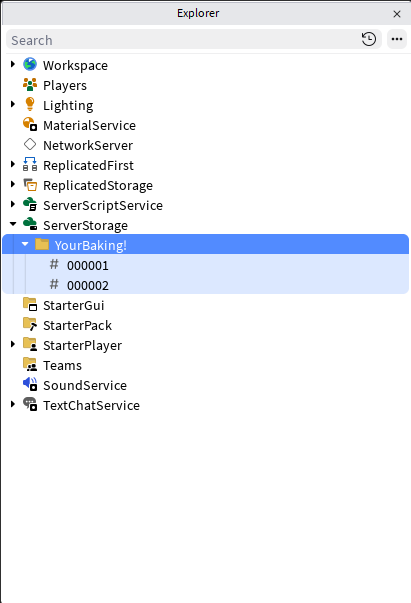
Each numbered child is one base64 StringValue, and the folder itself carries the bake's metadata as
attributes, which the Explorer doesn't show:
ServerStorage
└── YourBaking!          -- attributes: ChunkCount, Version, ByteLength
    ├── 000001           -- StringValue, base64 chunk
    └── 000002
The chunk count depends on grid size; a small bake may produce a single 000001. Write clears any
existing StringValue children first, so re-baking into the same folder replaces the old data rather
than corrupting it by mixing chunk sets.
Step 2: load at runtime
local blob = Vetra.OccupancyChunks.Read(ServerStorage:FindFirstChild("YourBaking!"))
local grid = Vetra.StaticOccupancy.Deserialize(blob)

local Behavior = Vetra.BehaviorBuilder.new()
    :StaticOccupancy(grid)
    :Build()
Read sorts the chunks by name and concatenates them, so the numeric %06d names matter, don't
rename them. It returns nil if the folder is missing or holds no StringValue children, which lets
you fall back to a live bake:
local folder = ServerStorage:FindFirstChild("YourBaking!")
local blob   = Vetra.OccupancyChunks.Read(folder)

local grid
if blob then
    grid = Vetra.StaticOccupancy.Deserialize(blob)
else
    warn("No baked occupancy found — baking at startup")
    grid = Vetra.StaticOccupancy.new(4)
    Vetra.VoxelBaker.BakeRegion(grid, CFrame.new(0, 50, 0), Vector3.new(2048, 512, 2048))
end
Deserialize reads the voxel size out of the blob's header, so the loaded grid always matches the
size it was baked at, you don't pass it again. It asserts on a bad header (bad magic (not a Vetra occupancy bake)), so a wrong or corrupted folder fails loudly rather than silently producing an
empty grid.
A loaded grid describes the geometry as it was at bake time, and the grid is what bullets collide against. Move a wall and bullets keep colliding with where it used to be and pass straight through where it now is. A part added after the bake doesn't exist as far as bullets are concerned.
Re-bake and re-save whenever static geometry changes. The Version attribute is there for you to
stamp your own map revision so you can detect a stale bake instead of shipping one.
| Function | Returns | Description |
|---|---|---|
grid:Serialize() | string | The grid as a binary blob. |
Vetra.StaticOccupancy.Deserialize(blob) | grid | Rebuilds a grid from a blob. Voxel size comes from the header. |
Vetra.OccupancyChunks.Write(folder, blob, version?) | , | Base64-encodes and splits blob across StringValue chunks under folder. Clears existing chunks first, and sets the ChunkCount, Version, and ByteLength attributes. |
Vetra.OccupancyChunks.Read(folder?) | string? | Reassembles and decodes the blob. nil if folder is nil or has no chunks. |